
 POST /webhooks/teachable
 Advanced Teachable Email Syncing: Handling Refunds & Progress Tags
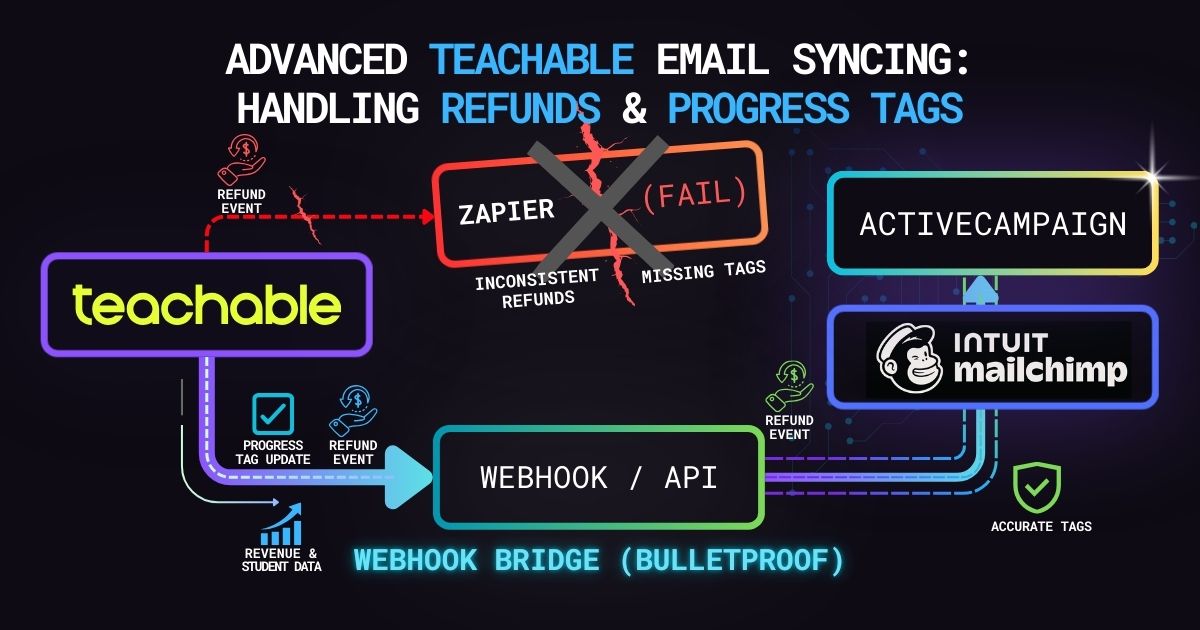
Why your Zapier email integration is failing your marketing team, and how to build a robust ActiveCampaign or Mailchimp webhook bridge.
Connecting Teachable to ActiveCampaign or Mailchimp via standard automation tools usually works on day one. A student buys a course, and they get added to a list.
But as your course scales, the cracks start to show.
What happens when a student requests a refund? With a basic integration, they stay on your buyer’s email list, meaning you might accidentally pitch them an upsell for a product they just returned. What if they complete 50% of the course and you want to trigger a check-in sequence? Standard tools charge premium tier prices to handle this complex, multi-step logic—if they can handle it at all.
The Developer Solution: Event-Driven Architecture
Teachable’s webhooks don’t just broadcast new sales; they broadcast everything. By building a custom Node.js endpoint, we can listen for specific lifecycle events and map them directly to ActiveCampaign tags.
Securing the Endpoint (The Teachable Flaw)
Unlike Stripe or Shopify, Teachable does not cryptographically sign its webhooks. If you leave your endpoint public, anyone can forge a payload and corrupt your email list. We secure this by injecting a strict authentication token into the webhook URL itself (e.g., ?token=YOUR_SECRET_TOKEN), rejecting any traffic that doesn’t include it.
The Code: A Smart Webhook Listener
This Express.js snippet demonstrates how to catch Teachable webhooks, verify the authorization token, and apply complex tagging logic to an ActiveCampaign contact based on exactly what the student did.
const express = require('express');
const axios = require('axios');

const app = express();
app.use(express.json());

const AUTH_TOKEN = process.env.TEACHABLE_WEBHOOK_TOKEN;
const AC_API_URL = process.env.ACTIVECAMPAIGN_URL;
const AC_API_KEY = process.env.ACTIVECAMPAIGN_KEY;

app.post('/webhooks/teachable', async (req, res) => {
  // 1. Gateway Security: Validate the secret URL token
  const providedToken = req.query.token;

  if (providedToken !== AUTH_TOKEN) {
    console.warn('Unauthorized webhook attempt blocked.');
    return res.status(401).send('Unauthorized');
  }

  // Acknowledge receipt immediately to prevent timeouts
  res.status(200).send('Webhook received safely');

  const eventType = req.body.type;
  const payload = req.body.object;
  const userEmail = payload.user ? payload.user.email : payload.email;

  try {
    // 2. Route the logic based on the Teachable Event
    switch (eventType) {
      case 'Transaction.Created':
        // Student bought a course: Add "Buyer" tag
        await updateActiveCampaignContact(userEmail, { tagId: 101, action: 'add' });
        break;

      case 'Transaction.Refunded':
        // Student refunded: Remove "Buyer" tag, Add "Refunded" tag
        await updateActiveCampaignContact(userEmail, { tagId: 101, action: 'remove' });
        await updateActiveCampaignContact(userEmail, { tagId: 105, action: 'add' });
        break;

      case 'Enrollment.Completed':
        // Student finished the course: Trigger graduation sequence
        await updateActiveCampaignContact(userEmail, { tagId: 202, action: 'add' });
        break;

      default:
        console.log(`Unhandled event type: ${eventType}`);
    }
  } catch (error) {
    console.error('ActiveCampaign sync failed:', error.message);
  }
});

// Helper function to interact with the ActiveCampaign API
async function updateActiveCampaignContact(email, tagData) {
  // Logic to find contact ID by email, then apply/remove the specific tag
  // using standard ActiveCampaign REST API endpoints...
}

app.listen(3000, () => console.log('Teachable-to-ActiveCampaign bridge running'));
Why this architecture wins
- Data Integrity: Your email lists stay perfectly in sync with your actual Teachable revenue. If someone refunds, your marketing automation knows instantly.
- Granular Targeting: By listening to
Enrollment.PercentorLecture.Completedwebhooks, you can build highly specific retargeting campaigns for students who get stuck in week 2 of your cohort. - Cost Efficiency: Running a serverless function costs pennies a month, completely eliminating the need for expensive Zapier paths or Make.com operations.
Architect's Note: Blueprints vs. Production
The code snippets above are architectural blueprints designed to demonstrate core logic. Before deploying to a live environment, this code must be wrapped in robust error handling, rate-limit backoffs, and centralized logging infrastructure. Do not blindly copy-paste into production.
Need an enterprise-grade integration?
If your team doesn't have the bandwidth to build and maintain this infrastructure, let's lock down your data pipeline before it gets exploited.
Let's talk architecture