
 POST /webhooks/database
 Building a Resilient Teachable to Airtable Sync (Why Zapier Breaks)
Google Sheets and Zapier are too fragile for production revenue data. Learn how to build a bulletproof webhook bridge to Airtable.
If you run a high-volume Teachable school, you need a database. Most creators start with a Zapier integration that pushes new sales into a Google Sheet.
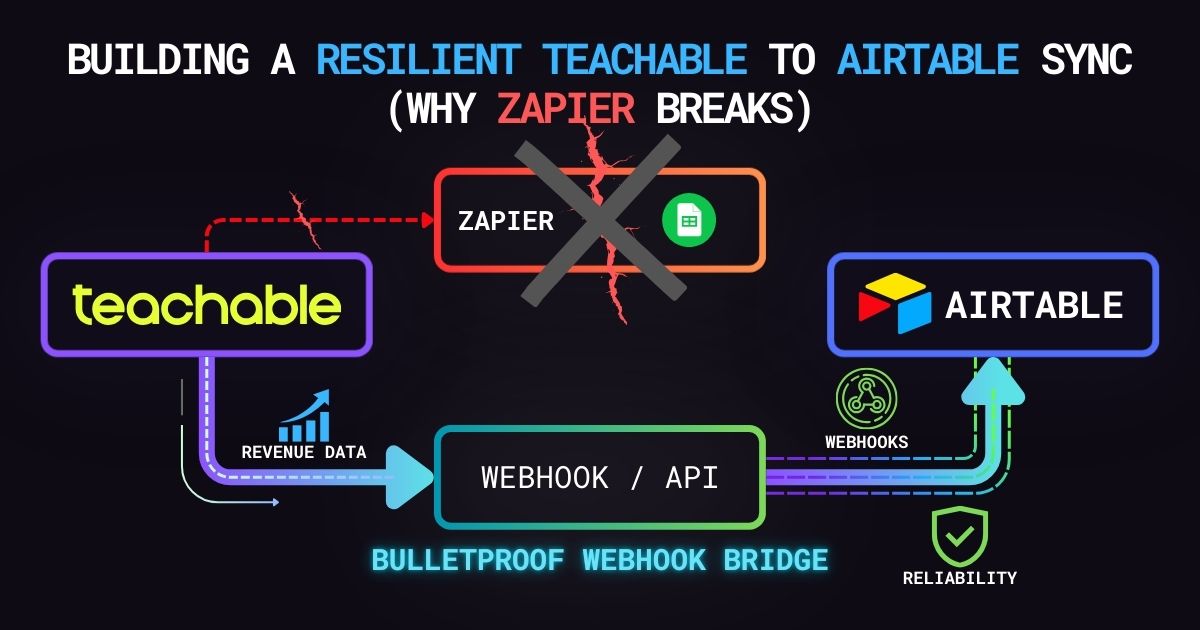
It works perfectly—until someone on your team renames the “Email” column to “Student Email.” Zapier immediately loses the mapping, the integration silently fails, and you lose three days of revenue data before anyone notices.
Google Sheets is a spreadsheet, not a relational database. When you outgrow it, you need to upgrade to Airtable. But instead of relying on fragile no-code mappings, the enterprise solution is to build a direct, schema-validated API bridge.
The Architecture: Bulletproof Data Flow
By controlling the webhook receiver in Node.js, we can intercept the Teachable payload, format it exactly how our database expects it, and handle API rate limits gracefully.
Furthermore, because Teachable lacks native webhook signatures, exposing a raw endpoint is a massive security risk. We wrap our listener in a token-validation gateway to ensure only legitimate Teachable traffic can write to our Airtable base.
- Secure the Gateway: Reject any request missing our custom
?token=parameter. - Catch the Webhook: Listen specifically for
Transaction.Created. - Transform the Data: Map Teachable’s nested JSON array into a flat Airtable record.
- Error Handling: If Airtable rejects the payload, trigger a Slack alert rather than failing silently.
The Code: Secure Node.js to Airtable API
This snippet demonstrates how to safely catch the Teachable transaction and write it directly to an Airtable base using their official SDK.
const express = require('express');
const Airtable = require('airtable');

const app = express();
app.use(express.json());

const AUTH_TOKEN = process.env.TEACHABLE_WEBHOOK_TOKEN;

// Initialize Airtable Base
const base = new Airtable({ apiKey: process.env.AIRTABLE_PAT }).base(process.env.AIRTABLE_BASE_ID);

app.post('/webhooks/database', async (req, res) => {
  // 1. Gateway Security Validation
  const providedToken = req.query.token;

  if (providedToken !== AUTH_TOKEN) {
    return res.status(401).send('Unauthorized: Invalid webhook token');
  }

  // Acknowledge receipt immediately
  res.status(200).send('Webhook received safely');

  const eventType = req.body.type;
  const payload = req.body.object;

  if (eventType === 'Transaction.Created') {
    try {
      // 2. Map Teachable payload to your Airtable Schema
      await base('Student Transactions').create([
        {
          "fields": {
            "Transaction ID": payload.id.toString(),
            "Student Name": payload.user.name,
            "Student Email": payload.user.email,
            "Course Name": payload.course.name,
            "Revenue (USD)": (payload.total / 100), // Convert cents to dollars
            "Purchase Date": payload.created_at
          }
        }
      ]);
      console.log(`Successfully synced transaction ${payload.id} to Airtable`);

    } catch (error) {
      // 3. Robust Error Logging (Send to Slack/Sentry in production)
      console.error('Airtable sync failed:', error.message);
    }
  }
});

app.listen(3000, () => console.log('Secure Teachable-Airtable sync running'));
Why this architecture wins
- Schema Validation: The API enforces strict field types. If someone tries to put text in your Revenue column, the API rejects it cleanly instead of corrupting your database.
- Relational Power: Once the data is in Airtable, you can easily link student records to specific cohorts, automatically calculate Lifetime Value (LTV), and trigger advanced marketing sequences.
- Total Stability: No more waking up to broken Zapier paths.
Architect's Note: Blueprints vs. Production
The code snippets above are architectural blueprints designed to demonstrate core logic. Before deploying to a live environment, this code must be wrapped in robust error handling, rate-limit backoffs, and centralized logging infrastructure. Do not blindly copy-paste into production.
Need an enterprise-grade integration?
If your team doesn't have the bandwidth to build and maintain this infrastructure, let's lock down your data pipeline before it gets exploited.
Let's talk architecture